Saturday, October 17, 2015

Thursday, October 15, 2015
Vlog#7 Multimedia: Gamestar Mechanic
This week I was introduced to Video Game creation in my multimedia class. As soon as I read the assignment for this week, I panicked: "Students will be creating a 5 level video game using Gamestar Mechanic". Wow, I thought. This is going to be challenging. That was an understatement. In order to be able to publish a game in Gamestar Mechanic you have to complete 5 different missions with multiple levels each. Well, here I go, how difficult can it be to play video games? What's all this fuzz about video games?!
I am not a game video game player. I am not that old but let's say that PacMan and Mario Brothers were a must when I was growing up. I tried video games and I was never proficient at them. Since I did not experience success, I quit. I saw no purpose. Well, my opinion about video games has changed. There is actually a set of skills, knowledge, and abilities required to be successful at playing video games. My 12 year old summarized it: I told him I was frustrated because the evil spirits were too fast and my avatars were getting killed. "They are too fast", I said. My son responded: "Mom, I think you are too slow!" He is right. I am officially considered a digital immigrant. I have a digital accent- there are certain skills I lack and in regards to video games, and just like with spoken language, there are certain sounds my tongue just can't and won't pronounce right. My digital accent in video game playing is my inability to quickly do eye- hand coordination motions to achieve proficiency in gaming.
How is this important in technology integration? It seems to me that in the 21st century, it is important for teachers to remember who we are in the digital world. Don't force it. Approach technology with lots of practice, practice, practice. Be willing to recognize that you have a digital accent and others will notice that you are not a native. Accept with pride that there will be things you will not do right and that others might have a hard time understanding your point or your frustration. Nevertheless, just like when speaking a foreign language, accents are beautiful and identify you for who you are. Admit when you need help from others and don't take the corrections or feedback too personal. Integrate technology to the best of your abilities and show grit. Keep at it and have fun in the process!
Tuesday, October 6, 2015
Vlog #6 Multimedia: Playing Around with Virtual Reality

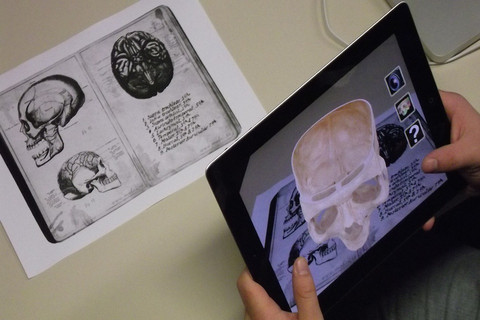
It is truly amazing to realize how much there is to discover in the area of Augmented Reality (AR) and its uses in the classroom. This week I played around with several AR apps that are fun and that can be educational. My professor Joe Marquez showed us how to use Anatomy 4D, Quiver Vision 3D coloring, Elements 4D, and some other fun apps to create special effects such as Green Screen Apps. There is so much to discover that I decided to try out two apps in my classroom: Anatomy 4D and Quiver Vision Coloring.
I recommend that teachers explore AR apps in the classroom for fun and then decide which ones may have a practical application in the classroom. I believe learning has gotten more interactive and engaging with all that AR apps have to offer. Here is a Vlog I created to show my excitement about AR apps and a sample of students' excitement when they were playing: around with AR in the classroom.
Monday, September 28, 2015
Vlog #5 Multimedia Tools: Using Video Assessment Tools Platforms
Spanish 1 students will soon be required to create and present their first dialogue in Spanish. They will be required to memorize and present the project in front of the class. In order to scaffold knowledge, I have learned to use video assessment tools. One of them is Zaption. Zaption allows you to use any You Tube Video to insert interactive features to check for understanding and assess mastery of knowledge. Zaption offers a free trial version. It also offers a platform where students and teachers can find preloaded "tours". Tours are interactive videos that students use to learn about a topic and assess their understanding.
I was really impressed about the engagement a video assessment platform can offer. I was doing some research about video assessment tools. I explored different ones. I came across an interactive math lesson in math. It was about percentages. My 12 year old son was practicing his Saxophone in the same room. The video I was playing got his attention and he was all excited. He wanted to watch it. He started watching it and without asking me he started answering all the math questions about percentages. He was so engaged and excited ( I was thrilled! He was willingly reviewing math percentages!). Later he noticed that the video was 8 minutes long. He told me: "Mom, that was 8 minutes? It did not feel like it!"
I like the possibilities that I am finding in video assessment tools. I am using video assessment tools now to scaffold and assess knowledge. Here is a short video vlog that describes how I use video tools.
Monday, September 21, 2015
Vlog #4 Multimedia: Google Hang Outs and More
I can't believe there is so much to learn about multimedia. I thought I was very fluent in digital literacy and technology. Through my classes in the Masters in Educational Technology I am learning that there is more than one way to do something. This week I learned about broadcasting live on the internet. I used Google Hangs Out on Air and recorded a lesson and a vlog in a different format. I find Google Hangs Out on Air to be an extremely useful tool for recording tutorials, co-teaching, and helping students and professionals stay connected. Here is a snap shot of what I learned:
Sunday, September 13, 2015
Vlog #3 Multimedia Learning Assumptions: The Principles
 In this short presentation I gather several resources in the form of links which help me document and explain the principles of multimedia learning based on the book Multimedia Learning by Dr. Richard Mayer. I used YouTube video upload feature and edited the video using the annotations tool to add links, text, and other elements.
Sunday, September 6, 2015
Vlog #2 Playing with Multimedia
Here is the second installment of my 6-8
week Vlog Series about multimedia. In this Vlog I quickly talk about playing
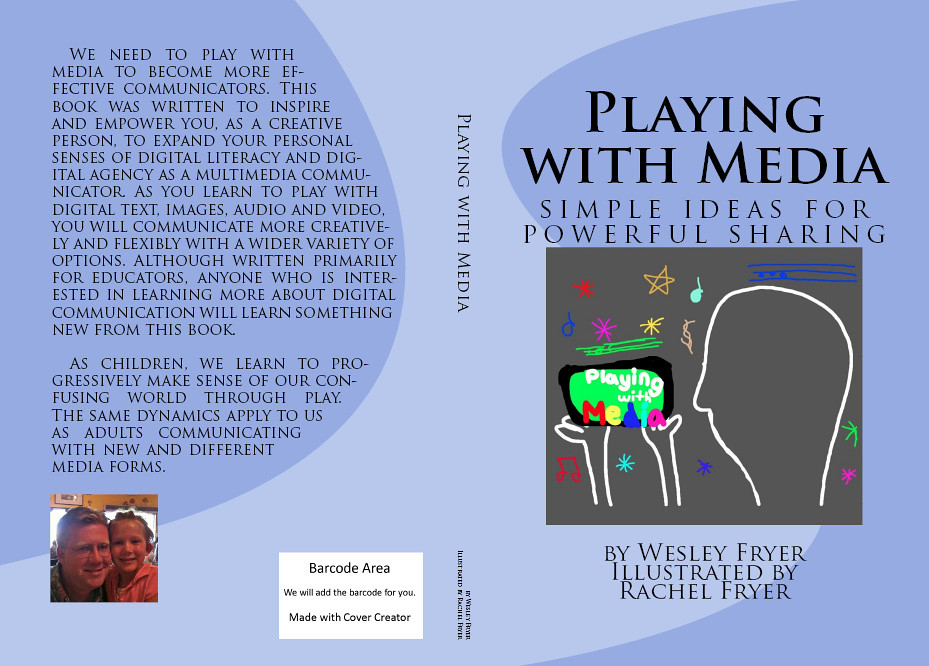
with multimedia and suggestions based on Wes Fryer's book Playing with Multimedia: Ideas for Powerful Sharing (Fryer, 2011) along with new discoveries in my own learning in the
Master’s in Educational Technology.
Wes Fryer
(2011) does a very good job providing lots of resources for teachers who want
to incorporate multimedia in the classroom. I recommend getting the e-book
version of this book in order to have access to all the hyperlinks and
additional resources that Fryer includes in his book. I want to highlight some
of the resources that Fryer mentions in his book that I found to be extremely
helpful.
Blogs
Fryer highly recommends using blogs and wikis for teachers. Teachers can create a classroom blog in which students submit written
work and rich media and the teacher acts as a moderator before publishing. He
also conveys the message that either blogs or wikis are an excellent way to get
to listen to each student’s voice and opinions about a topic. Most
frequently there is never enough time to listen to all students in a class. Blogs and wikis allow for collaboration and interaction. Check out Fryer's blog about Classroom Blogging Options.
I personally use Blogger and despite some complicated setting up issues, once you get past the setting up of the blog it is very easy to use. Another alternative is the VLOG. A vlog is a recorded version of a regular blog. This is the simplest to use in a few easy steps:
I personally use Blogger and despite some complicated setting up issues, once you get past the setting up of the blog it is very easy to use. Another alternative is the VLOG. A vlog is a recorded version of a regular blog. This is the simplest to use in a few easy steps:
a) Sign unto Google with your account
b) Go to You Tube on the applications
c) Click on the upload buton
d) On the right hand corner select record
e) Give permission to your camera
f) Start recording
g) Add a title and check on the settings in case you want to add a description or other features
Digital Library
Fryer suggests
to join Scribd, a digital library for all sorts of
digital books and comics. Scribd has a 14 day trial.
Video Making

I had the
opportunity to use Crazy Talk 7 and Bitmoji app on Android to
create a one of a kind character that talks. Crazy Talk 7 is one of the
best products to create fictional character that you can make talk by recording
and modifying your voice or by uploading previously recorded audio files and
attaching them to your character. Crazy Talk offers a 15 day trial. Bitmoji is
a free app that students can use to create their personal avatar or bitmoji to
send to others or use as images for other projects.

I recommend this project for delivering information, allowing students to become a fictional character
to demonstrate mastery of content, or just as a fun way to engage students in
the classroom. I created a character named Sofia that will help me introduce
concepts in my Spanish 1 classes. Here is a simple project I created using the
free trial version of Crazy Talk 7 and Bitmoji.
Subscribe to:
Posts (Atom)