Sunday, September 18, 2016

Grit: A Personal Story


Recently I have heard the word GRIT as something that education professionals should be teaching to students. It seems to be a buzzword that people are writing about, talking about, and marketing as one magic pill to make students succeed in the classroom. As part of one of my projects for the Masters in Educational Technology, we were asked to create a digital story using a digital media platform of choice as well as a topic we could use for educational purposes.


I thought about it several times. I really did not know what to do. I did some research in digital storytelling and I came across Adobe Express. I had used Adobe Express briefly on my Ipad just to try it out. I really liked it back then. I explored it again and I realized that Adobe Express can be used on any device. I tried it on my Chromebook at work and I like how user friendly it is. I can use this tool when we get a Chromebook cart in the classroom. Students can use digital stories to create content in all subject areas through fiction, historical narratives, personal stories, the teaching of a new concept, comic strips, or to explain processes in  Math and Science. Story Center. Listen Deeply. Tell Stories is a free online platform that offers access to many stories created around the world. It is worth checking if you are embarking on a digital storytelling project. 

This is an example of a personal story I created using Adobe Express. This is my personal opinion on GRIT. The transcript for the presentation can be found at Google Docs Grit: Personal Story Transcript. 

Disclaimer: This video contains a couple of religious references. Please watch from beginning to end. Showing religious content in a public school setting might not be acceptable under school district policies. Please reference your school policies if using this video in public school settings.  


Sunday, September 11, 2016

Cellphones Out Instruction In

Before we started the school year, I made sure that I would not forget all the changes that I wanted to implement for the new school year. I love being a teacher, it hardly ever gets repetitive. New students, new challenges, and new ways to make the learning relevant. One of the changes I could not wait to implement was my cellphone use policy.

For the past two years, I was so excited about technology integration that I wanted to use whichever kind of technology was available. The school tablets that we were using were slow and would block a lot of helpful websites for classroom activities. In my desire to utilize technology in meaningful ways I had a very relaxed policy on cellphone use. Students were instructed to use their phones with instructional purposes only….
That did not work well in the classroom. I spent an entire school year competing for my students’ attention. Their interest was always divided between trying to do their work and having a peek at their phones to conduct personal business. I felt lost. My “put away the phone” routine soon became old. Students would justify their use by pretending they were looking for class information. It was an uphill battle, one that I did not win.
Even though my cell phone policy has not changed, my monitoring of it has. Here are the incredible benefits that I see now:


Engagement
In the past, when there were a few minutes of down time, students would pull out their phone and engage with their phone. Now, students even bring book to read while they are waiting on others to finish an activity or they engage in conversation with others.

Collaboration
In the past, Google was the to go place to have questions answered. Now, students are actually forced to work together, ask questions, help each other, and use their knowledge to solve problems.

Effort
Allowing phones in the classroom provided a tool for students to engage in cheating and plagiarism as they would copy the work of others through pictures. Even if I was monitoring the classroom, having a phone on the table at all times created too many distractions and negative behaviors.

My policy now allows for cellphone use only for a structured learning activity. Students pull out their phones during the activity and have to put them away once we finished. I know it seems like a “no brainer”, but it took me a whole year to refine my cellphone policy. I see too many teachers nowadays taking the lay back approach. Their thinking is that students should know what to do and not to do even if their phones are out. I disagree. As I explained to parents during Back to School Night: “My cellphone policy might be strict now, but rest assure that when your students are in my class, they will not be taken care of personal business on their phones”. As a parent, I want the confidence that if my child is in school, there are learning opportunities taking place.


Sunday, August 28, 2016

Kahooting a Syllabus

The new school year is now well into three weeks of instruction already. As a high school teacher,  the first few weeks of the school year are an interesting parade of new names and new faces. Students come and go as they decide if they are in the right classes. I have decided that handing out a syllabus on the first few days of the school year is futile. I end up using up half my paper allocated for the semester which in turn results on full garbage cans at the end of the day as students move to other better suited classes for the school year.


Nevertheless, it is imperative that students understand and abide by classroom expectations since day one. Otherwise, the school year will become a senseless battle ground to abide by expectations while maintaining sanity and a conducive learning environment.

I am on the student side on this one, going over a syllabus is extremely boring...... That is why I needed to do something new. After a few days in class, I handed out the students a copy of my 3 page syllabus. I asked students to read it silently. We went over a few questions and I clarified any concerns. After that. I told them we were going to play Kahoot to review if they understood expectations. Kahoot is a gamified platform to assess knowledge and understanding in a fun and engaging way.

I created my Syllabus Kahoot in a situation like scenario. My question prompt was imaginary scenarios like this one: "Maria was too tired to do her homework last night..... ". For the answers, I created four possible options with only one or two being correct. Example: a) That's ok, Maria can turn in her homework any time (incorrect answer), b) Maria won't be able to turn in her homework because she doesn't have an excused absence (correct answer). I hope you get the idea. Students had to to try to match a situation and possible answer depending on the expectations they had read on the syllabus. I threw a few funny statements in my answers that made students laugh. We had a lot of fun. Students were able to take home a printed copy of the syllabus after a few weeks into the semester and once we knew which students were staying. If you would like to see a sample of my syllabus Kahoot please go to https://getkahoot.com/ . After creating an account or signing in, search on public Kahoots by author and type educatortalk . 


Sunday, April 10, 2016

Digital Citizenship 101

In the Spring of 2015 I started my Masters in Educational Technology. A year later I am in the process of writing the methodology section of my research project and a few weeks or months from testing a project in a high school setting. I am passionate about helping students use electronic devices and access the internet from a legal, ethical, and safe perspective. The work of Mike Ribble has been fundamental in directing my research efforts to the right places and for the right reasons. 
Out of my desire to help teachers and students find more digital citizenship resources, I have created a blog called: Digital Citizenship 101. The title came to me as I was doing my literature review and found out that teaching digital citizenship in schools should not be an added curriculum tasks for educators. Schools have traditionally been a place where citizenship is expected to be taught for citizens to become active participants of democratic societies.

It is no longer a matter of choice to teach or not to teach digital citizenship in the classroom. As we move on with technology integration plans in school districts, it is our obligation to ensure that students will be protected from what it can be the devastating effects of careless use and exposure to online access. The foundation of www.educatortalk.com is to promote 21st Century skills in a responsible and ethical manner. Please check my new digital citizenship project and comment on it. 


Tuesday, February 16, 2016

TPACK Model


TPACK Model 

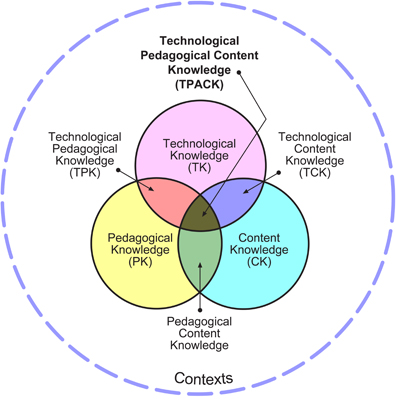
TPACK is one of the technology models available to educators in their quest to learn how to use a framework to evaluate and balance skills and knowledge for technology integration in the context of their current ability to use content and pedagogy as interrelated elements of instruction. The strength of the TPACK model resides in the fact that it looks at the complexities of teaching from the perspective of content, pedagogy, technology, and the intersections of each one as part of the instructional process. It is in the practice and application of these interrelations that technology cannot be integrated as an add on or a with a one size fits all approach. 

Recommendations

Revolution in education continues to be the work and the task of human beings, not the work of technology tools that are randomly used to plan and deliver instruction. The TPACK model teaches us that revolution in education occurs when we skillfully look and balance the cognitive process and interactions occurring between what we know and want our students to know, how we want our students to know it, and how technology can support and transform the learning process.

The TPACK model should not be promoted in education circles as a model to learn and follow but rather as a framework that helps teachers visualize and intrinsically balance the elements of instruction that come into play when designing and providing digital learning experiences for students.  Technology should be looked upon with critical eyes and an open mind when finding its practical application to specific content areas. The existing literature regarding TPACK suggests that we are on a discovery process for content and pedagogy transformation processes as new technologies change and determine how different subject areas are constantly being redefined and reinvented by the use of 21st Century digital resources.

It is imperative that educators continue to focus on mastery of learning objectives and the creation of authentic experiences through the use of technologies that promote discovery, creativity, connections, collaborations, as well as learning experiences that address existing global issues.


Thursday, October 15, 2015

Vlog#7 Multimedia: Gamestar Mechanic


This week I was introduced to Video Game creation in my multimedia class. As soon as I read the assignment for this week, I panicked: "Students will be creating a 5 level video game using Gamestar Mechanic". Wow, I thought. This is going to be challenging. That was an understatement. In order to be able to publish a game in Gamestar Mechanic you have to complete 5 different missions with multiple levels each. Well, here I go, how difficult can it be to play video games?  What's all this fuzz about video games?! 


I am not a game video game player. I am not that old but let's say that PacMan and Mario Brothers were a must when I was growing up. I tried video games and I was never proficient at them. Since I did not experience success, I quit. I saw no purpose. Well, my opinion about video games has changed. There is actually a set of skills, knowledge, and abilities required to be successful at playing video games. My 12 year old summarized it: I told him I was frustrated because the evil spirits were too fast and my avatars were getting killed. "They are too fast", I said. My son responded: "Mom, I think you are too slow!"  He is right. I am officially considered a digital immigrant. I have a digital accent- there are certain skills I lack and in regards to video games, and just like with spoken language, there are certain sounds my tongue just can't and won't pronounce right. My digital accent in video game playing is my inability to quickly do eye- hand coordination motions  to achieve proficiency in gaming. 

How is this important in technology integration? It seems to me that in the 21st century, it is important for teachers to remember who we are in the digital world. Don't force it. Approach technology with lots of practice, practice, practice. Be willing to recognize that you have a digital accent and others will notice that you are not a native. Accept with pride that there will be things you will not do right and that others might have a hard time understanding your point or your frustration. Nevertheless, just like when speaking a foreign language, accents are beautiful and identify you for who you are. Admit when you need help from others and don't take the corrections or feedback too personal. Integrate technology to the best of your abilities and show grit. Keep at it and have fun in the process!